Map an owner's entire fleet
“What does NextEra Energy's renewable portfolio look like across the US?”
Open Explore and set the Owner filter
From the homepage, switch to Owner mode and type “NextEra” — click the result to land on the Explore page with the owner filter pre-applied. Or go directly to Explore and use the Owner filter in the sidebar.
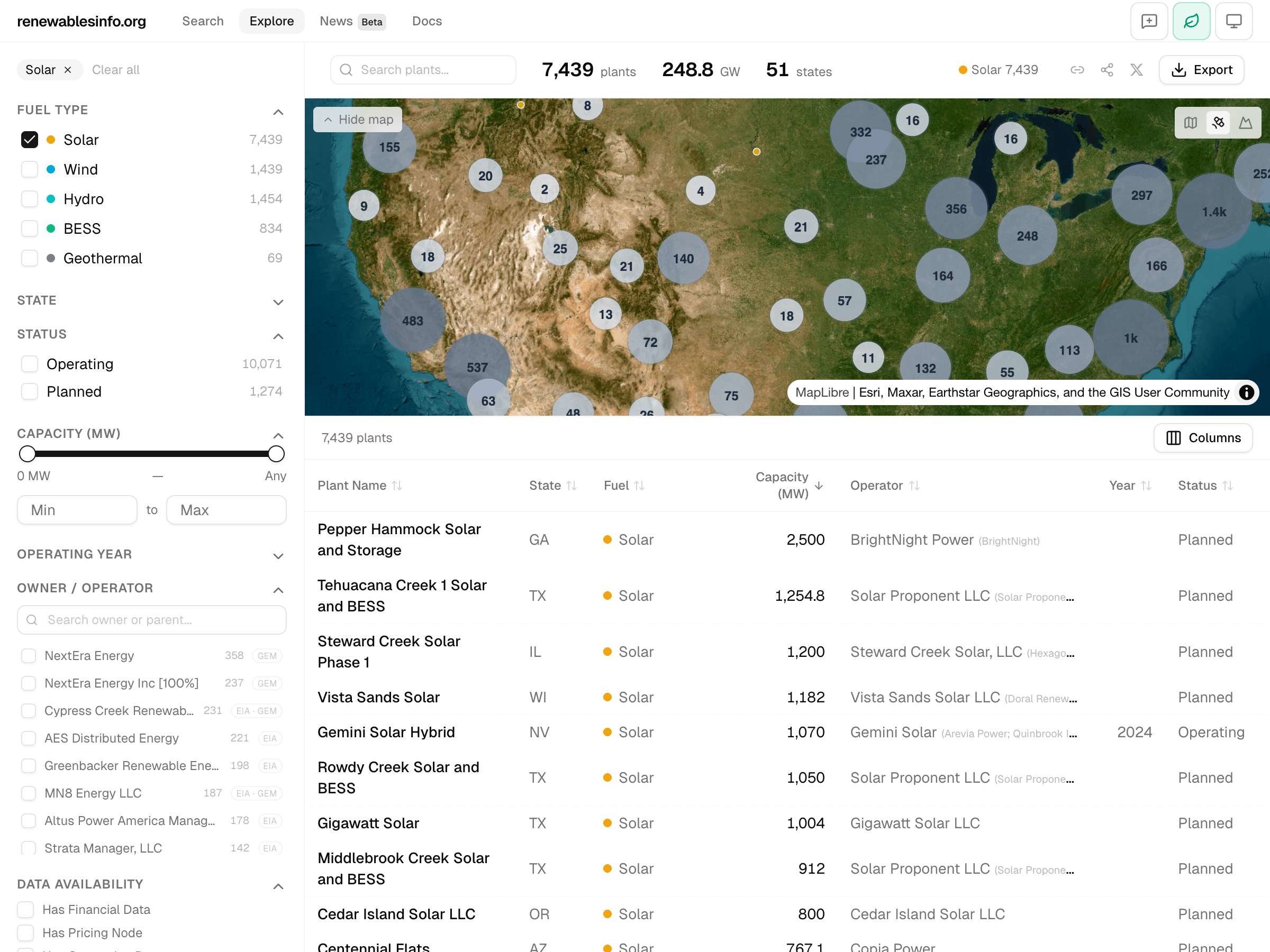
Read the map
The map updates instantly showing all matching plants. Clusters break apart as you zoom in. Each dot is color-coded by fuel type (yellow = solar, blue = wind, teal = hydro). Look for geographic concentration — where is the fleet weighted?
Check the KPI bar
The header shows total plants, total capacity in GW, and the number of states. On desktop, the top 5 fuel types are shown with color-coded dots and counts.
Sort and browse the table
Click the Capacity column header to sort descending. The largest assets appear first. Click any row to jump to that plant's detail page.
Export the filtered view
Click the export button to download the current filtered view as CSV or JSON. The export contains exactly the plants matching your filters — not the full dataset.
Key insight
The Owner filter combined with the map and KPI bar gives you an instant portfolio view. Filter, verify with the count and capacity totals, then export as CSV. The URL encodes the exact filter state — share it with a colleague and they see the same view.
Compare BESS projects across markets
“What utility-scale battery storage is being built, where, and with what specs?”
Filter to battery storage
On the Explore page, set Fuel Type = Battery Storage. Optionally add Status = Operating + Under Construction and a capacity minimum (e.g., 100 MW).
Scan the results
The map shows BESS projects by location. The table shows capacity, state, and operating year. Toggle additional columns (right side menu) to add technology details.
Drill into a project
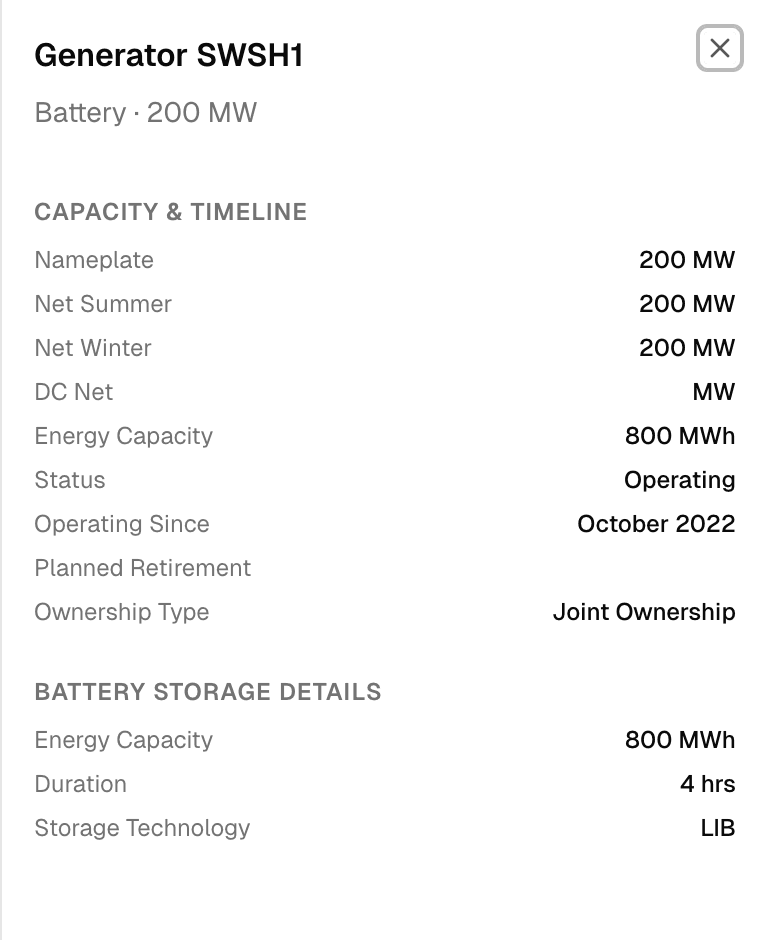
Click any plant to open its detail page. In the Engineering section, the BESS generator cards show chemistry (e.g., Lithium-ion), duration (e.g., 4 hours), DC/AC coupling type, and application flags (arbitrage, frequency regulation, etc.).
Key insight
This is the only open platform that combines EIA generator data with BESS-specific specs: chemistry, duration, coupling topology, and application flags. Filter by fuel type and capacity to find utility-scale projects, then drill into engineering details.
Which plants have pricing data in an ISO market?
“I need plants with resolved LMP nodes in CAISO for basis spread analysis.”
Filter by data availability and market
On the Explore page, toggle “Has Pricing Data” under Data Availability. Then set State = CA or look for an ISO filter if available.
Review the count
The KPI bar shows how many plants match. This is your universe of CAISO plants with nodal intelligence.
Check a plant's pricing section
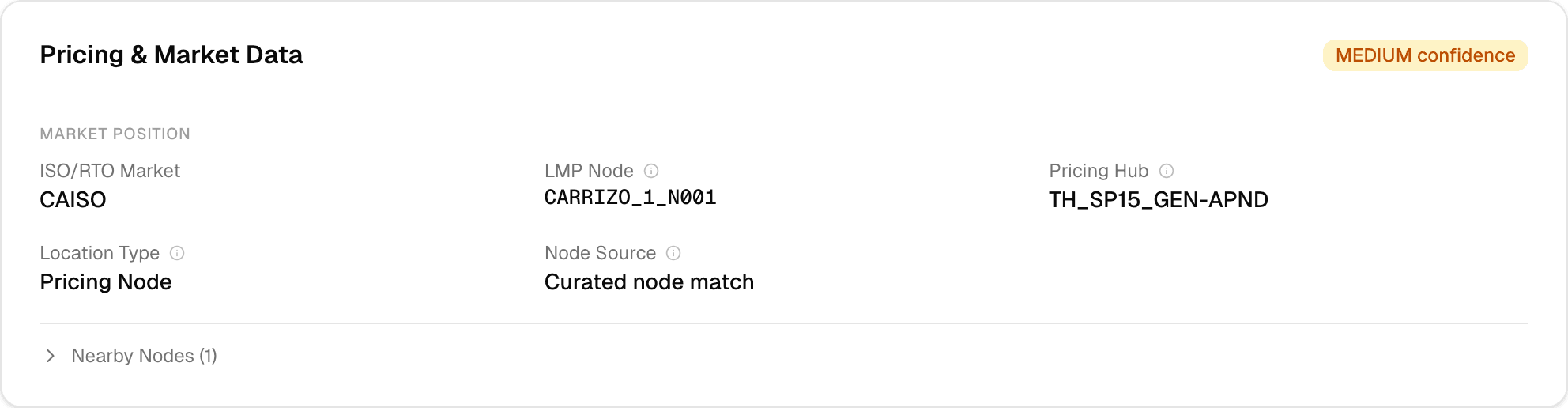
Click any plant and scroll to Pricing & Market. You'll see the ISO, LMP node name, pricing hub, and confidence badge. The “Node Source” field shows how the node was resolved (direct EIA report, spatial match to curated 55K node database, or cross-referenced from a neighboring generator).
Key insight
74% of generators in organized ISO markets have resolved LMP nodes. Hub assignment is at 99%. The Pricing section shows the exact node ID, the regional hub, the resolution method, and a confidence level — plus nearby alternative nodes.
What's coming
Planned
Owner portfolio pages — dedicated /owner/[name] routes showing all plants for a given parent company with aggregated capacity, generation, and financial metrics. Saved filter presets for quick access to frequently used portfolio views.
Exploring
Cross-plant aggregation API returning total capacity, weighted average capacity factor, and financial benchmarks for any filtered set. Agentic portfolio monitoring — “alert me when a NextEra plant changes status or appears in hazard news.”