The Explore page is a portfolio view of the entire US power plant fleet. Filter by any combination of criteria, see results on a map and in a sortable table, and export the filtered view as CSV or JSON. All filter state is encoded in the URL — every view is shareable.
Open the Explore page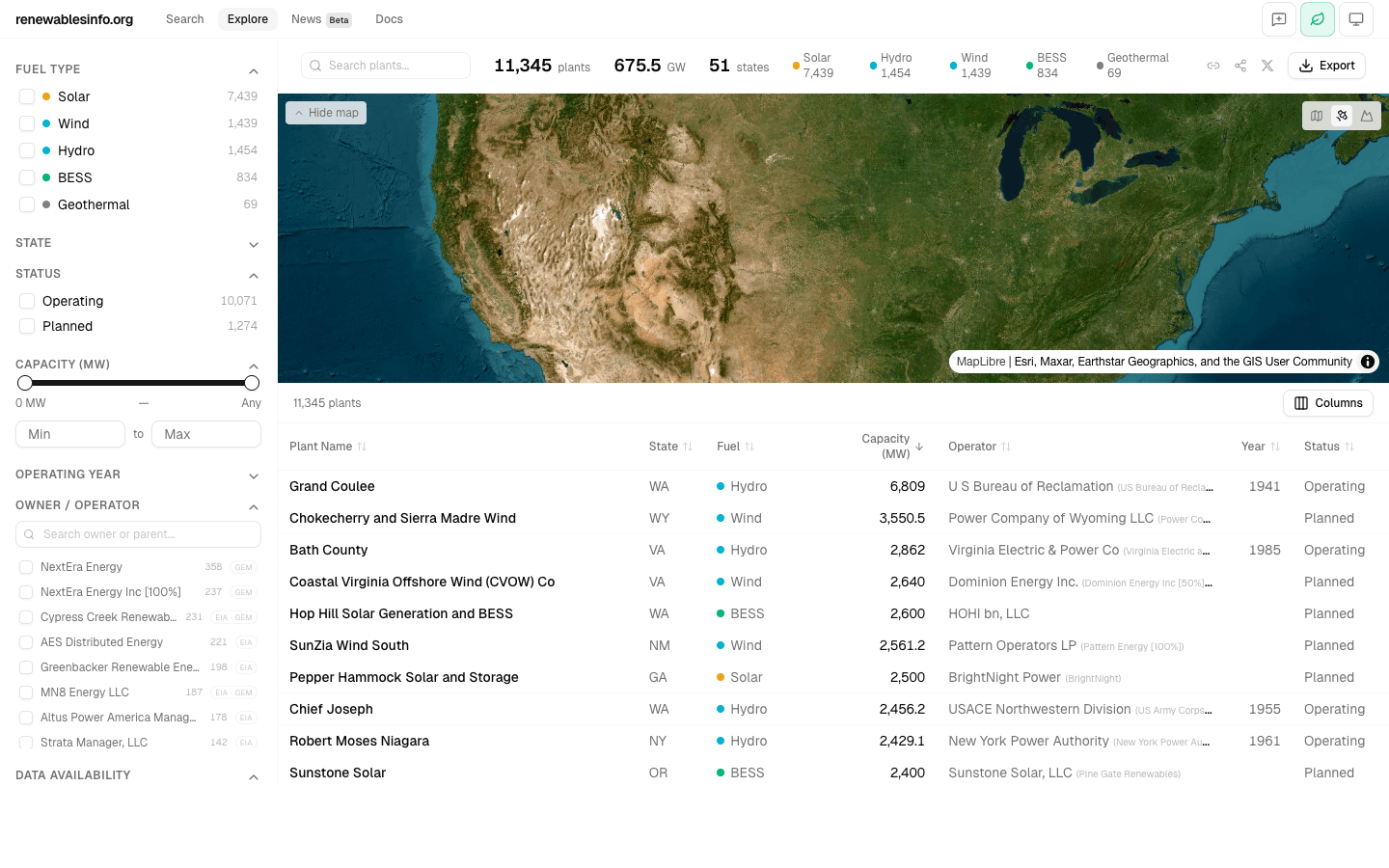
Quick entry from the homepage
The homepage search bar supports four modes: Name, EIA ID, Owner, and State. Searching by Owner or State navigates directly to the Explore page with the relevant filter pre-applied. For example, typing "NextEra" in Owner mode shows matching companies with plant counts — click one to land on Explore filtered to that owner's full fleet.
How it works
The Explore page loads the complete plant index (~15,000 rows, ~7 MB) into the browser on first visit. All filtering, sorting, and aggregation happens client-side in JavaScript — no server round-trips after the initial load. This means filter changes are instant, even across the full fleet.
Sidebar filters
The left sidebar contains 8 independent filters. Each filter narrows the results; they combine with AND logic (all conditions must match).
Fuel Type
Solar, Wind, Hydro, Nuclear, Natural Gas, Coal, Battery Storage, Geothermal, and more. Multi-select — choose any combination.
State
Filter by one or more US states. Searchable dropdown for quick selection.
Operating Status
Operating (OP), Standby (SB), Retired (RE), Under Construction, Planned, and other EIA status codes.
Capacity Range
Minimum and maximum nameplate capacity in MW. Useful for focusing on utility-scale assets or filtering out small facilities.
Operating Year
Filter by the year the plant began operating. Range selector covering the full history from the earliest plants to the latest commissioned.
Owner
Search by parent company name (GEM-sourced). Find all plants owned by a specific company or its subsidiaries.
Data Availability
Filter to plants that have specific data dimensions available — financial data, generation data, engineering specs, news coverage, etc.
Map
An interactive MapLibre map showing all plants matching the current filters. Plants are color-coded by fuel type using the same color system as the rest of the platform. Click a plant marker to see a summary popup; click through to its detail page. The map updates instantly as filters change.
Table
A sortable, virtual-scrolled table showing all matching plants. Click any column header to sort. The table handles thousands of rows smoothly through virtualization — only visible rows are rendered in the DOM. Column visibility can be toggled with the column selector. Click any row to navigate to that plant's detail page.
Aggregated metrics
The header shows live-updating summary statistics for the current filter: total number of matching plants and total nameplate capacity. These update instantly as filters change — useful for answering questions like "How many solar plants over 100 MW are operating in Texas?" without scanning the table.
Export
Export the current filtered view as CSV or JSON. The export contains exactly the plants matching your current filters — not the full dataset. If you spent time curating a specific slice (all NextEra solar in ERCOT, for example), the export respects that work.
Renewables-only mode
By default, the platform shows renewable and clean energy plants only (~8,500 plants). The scope toggle in the top bar (leaf icon) expands to all 15,053 US power plants including fossil fuels. This preference is reflected in the URL and persists across navigation.
Shareable URLs
Every filter combination produces a unique URL. Copy the URL from your browser and share it — the recipient sees the same filters, same results, same view. This makes the Explore page useful for collaboration: "Here are all BESS projects over 100 MW in California" is a link, not a description.